9. The AI copilot
The right rail → Copilot tab, the toolbar AI button, Ctrl/⌘ I for the
inline command bar, or any AI: command in the palette.
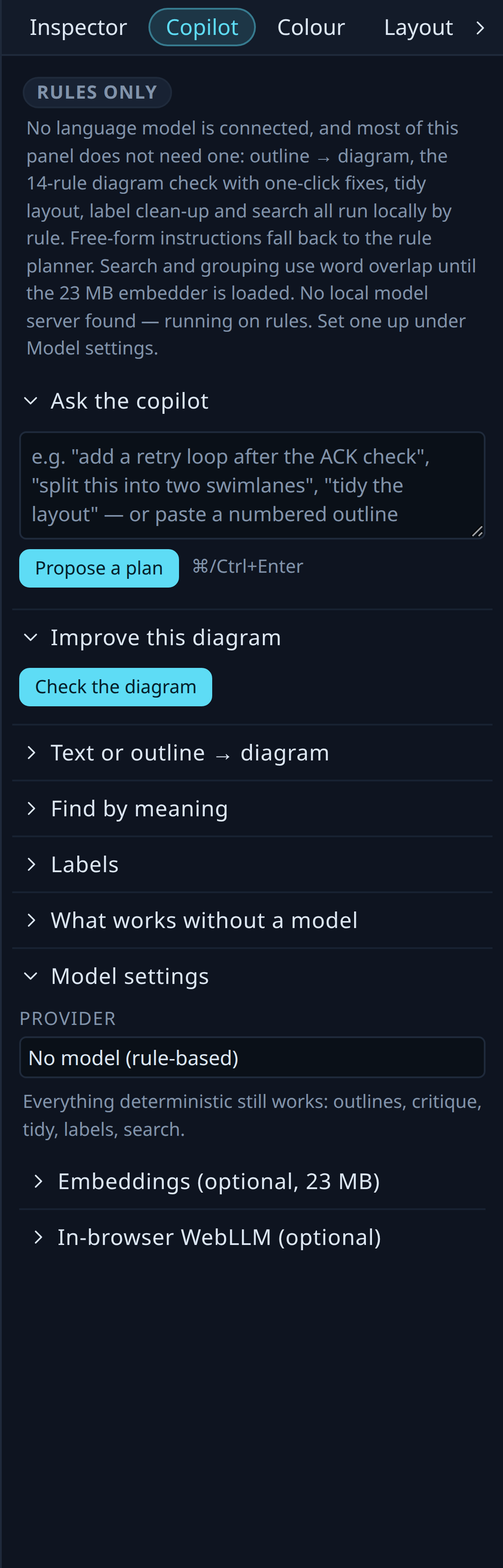
What works with no model at all#
Most of it. Every one of these is a pure function over the document with no network call and no download:
| Action | What it does |
|---|---|
AI: check this diagram for problems | Fourteen rule-based checks. Each finding carries the op plan that fixes it |
AI: preview every mechanical fix | Turns all the fixable findings into one plan |
AI: build a diagram from clipboard text | An outline, prose with arrows, meeting notes or code → a laid-out diagram |
AI: connect the selection to a related shape | Ranks candidates by topology and label meaning |
AI: group semantically related shapes | Finds a cluster and wraps it in a container |
AI: merge duplicate shapes | Near-identical labels |
AI labels: … | Consistent case, Title Case, Sentence case, strip punctuation, shorten, shorten-to-fit, unify terminology |
AI: actions for the selected shape | The two or three contextual actions worth offering |
Tidy layout | Layered auto-layout (longest-path ranks, barycentre crossing reduction) |
The fourteen are: dangling-edge, overlap, inconsistent-size,
near-miss-alignment, crossing-connectors, missing-branch,
unlabelled-branch, shape-contradicts-text, label-punctuation,
inconsistent-case, inconsistent-terminology, duplicate-label,
low-contrast (WCAG below 4.5:1) and orphan. A fifteenth, model-wording,
appears only when a model is connected. duplicate-label and orphan are
advisory — they carry no automatic fix, because a human has to decide.
Nothing is applied behind your back. Everything produces a proposal: the
canvas shows a ghost preview of the diff, the panel lists one line per
operation, and you press Apply. An applied plan is a single undo entry, and
AI: undo the last applied plan reverses it.
Providers#
AI: model settings (or the panel's settings section) offers four:
| Provider | What it is |
|---|---|
none | No model. The deterministic router runs alone — the default |
ollama | The Ollama daemon on this machine. Nothing leaves the device |
openai-compatible | Any /v1/chat/completions server: LM Studio, llama.cpp, vLLM, LiteLLM |
webllm | In-browser WebGPU. Needs a one-off ~1.5 GB download; stubbed out in the single-file build |
Settings live in localStorage under plota.ai.provider and are swappable at
runtime — the next request uses the new provider, with no reload.
Whatever the model returns is validated against the op schema before it is shown to you. An invalid plan is fed back to the model with its errors; if that fails too, the deterministic router answers instead. A model can therefore produce a wrong-but-valid diagram, but never a corrupt one.
Setting up Ollama#
ollama serve                 # start the daemon
ollama pull llama3.2         # get a model
curl http://localhost:11434/api/tags   # confirm it answers
Then open the editor at https://editor.plota.live and use AI: detect a local Ollama daemon (or the Detect button in the panel). The Ollama API remains
local at http://localhost:11434 when the daemon runs on your computer; the
browser origin that must be allowed is the editor's URL.
The CORS problem — read this one#
Symptom: curl http://localhost:11434/api/tags works perfectly, but the
editor says it cannot reach Ollama.
Cause: Ollama only sends an Access-Control-Allow-Origin header for origins
listed in OLLAMA_ORIGINS. A browser page served from
https://editor.plota.live is not on that list by default, so the browser blocks
the response. curl does not enforce CORS, which is exactly why it looks like
the daemon is fine.
Fix — restart Ollama with your editor's origin allowed:
macOS (menu-bar app):
  launchctl setenv OLLAMA_ORIGINS "https://editor.plota.live"
# then quit Ollama from the menu bar and start it again
macOS / Linux, running it yourself:
OLLAMA_ORIGINS="https://editor.plota.live" ollama serve
Linux (systemd):
sudo systemctl edit ollama.service
# add:
#   [Service]
#   Environment="OLLAMA_ORIGINS=https://editor.plota.live"
sudo systemctl daemon-reload && sudo systemctl restart ollama
Windows (PowerShell):
setx OLLAMA_ORIGINS "https://editor.plota.live"
# then quit Ollama from the system tray and start it again
OLLAMA_ORIGINS="*" allows every origin. Convenient while you try this out, but
it lets any page you visit talk to your models — prefer the exact origin.
Use whatever origin the browser address bar shows. For the hosted editor that
is https://editor.plota.live; the panel prints the exact line to copy, so you
should not have to work it out.
The app does not make you diagnose this yourself. A browser reports "refused the
connection" and "answered, but CORS blocked me" as the same opaque
TypeError: Failed to fetch, so the panel re-probes with mode: 'no-cors': an
opaque response proves the daemon is up and the real problem is
OLLAMA_ORIGINS. Failures are classified as cors, offline,
mixed-content, timeout, not-found, unauthorized or http, and each one
prints copy-pasteable remediation for the platform you are on.
Other Ollama notes#
- The base URL is host and port only —
http://localhost:11434, no/api, no/v1. - An HTTPS page can call
http://localhost:11434. Loopback addresses are "potentially trustworthy" origins, so this is not mixed content and the browser does not block it — which is whyOLLAMA_ORIGINSabove is the whole fix. Mixed content only bites when the daemon is on another host over plain HTTP, such ashttp://192.168.1.5:11434; put TLS in front of that one. - Since Chrome 142 a public site needs permission before it may reach your local network. If the origin is allowed and it still will not connect, look for that prompt — dismissing it fails the request silently.
- Daemons at 0.5.0 and newer are sent a JSON schema for the op plan, so the
plan is validated server-side as well; older builds get
format: 'json'.
Embeddings#
Semantic search, connection suggestions and duplicate detection use
transformers.js with Xenova/all-MiniLM-L6-v2 (~23 MB, cached after the first
load, CPU/WASM, no GPU needed). Offline, or with the CDN blocked, they fall back
to lexical similarity and say so — search, suggestions and lint all still work,
just less semantically. The single-file build always runs the lexical path.
The command contract#
Every AI action is a registry command with a stable id and a pure function
behind it. The full table — command ids, the op vocabulary, the critique rule
ids and the provider transports — is in
../../src/ai/COMMANDS.md. The same functions are
exposed as MCP tools by the sibling mcp-diagram-server repository.